
A global Restaurant administrator or active restaurant Owner may transfer funds and read detailed history. Manager access covers summaries; Employee access does not include financial summaries. Transfers use the acting character's personal bank account.
Banking separates money the restaurant can use from customer-held payment and payouts still being confirmed. Global administrators and the restaurant owner can perform bank transfers and read detailed financial history.
Open Banking and read the balances#
Select the restaurant, expand Business, and open Banking. Check the restaurant name before entering an amount.
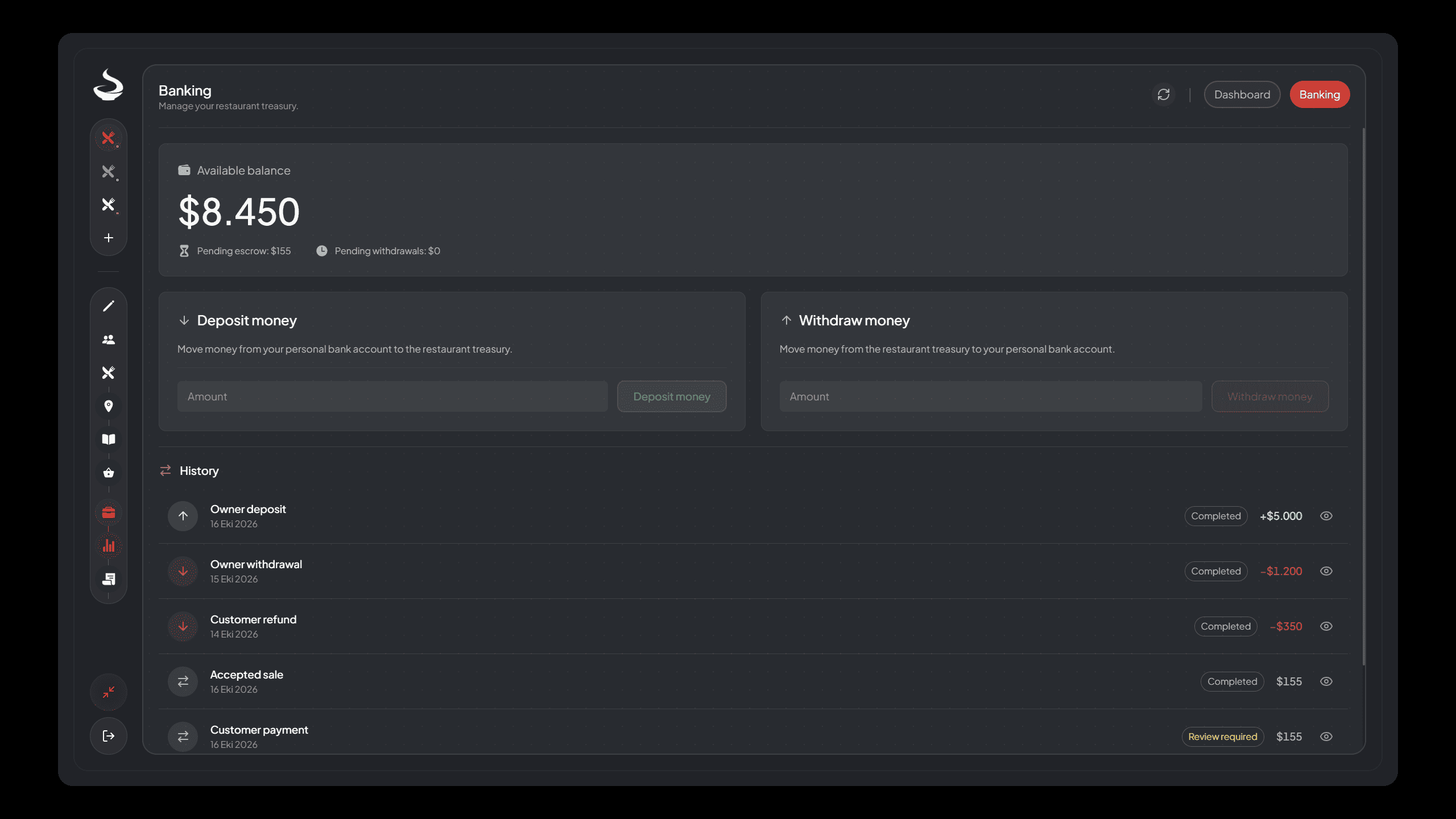
Banking showing available balance, pending customer escrow, pending withdrawals and paginated operation history.
| Balance | Meaning |
|---|---|
| available balance1 | Restaurant funds eligible for an authorized withdrawal |
| escrow2 | Confirmed customer payment waiting for order acceptance or refund handling |
| Pending withdrawals | Funds held while an outgoing owner payout is confirmed |
Do not add all displayed balances together and assume that total is withdrawable. Customer money awaiting acceptance is still a customer obligation.
Deposit from your bank#
Open Deposit money, enter a valid amount, review it and confirm. Deposits debit your personal bank account through the selected framework. A confirmed debit moves the money to Restaurant available funds.
If the bank rejects the debit, no deposit is added. If the result is unknown, check the transaction history and ask an administrator to review it before trying again.
Withdraw to your bank#
Open Withdraw money, enter an amount within available funds and confirm. The restaurant first reserves the amount in a payout hold, then attempts the personal bank credit.
A confirmed credit completes the withdrawal. A definite rejected credit releases the hold back to available funds. An unknown result stays held for review so the system cannot pay twice. Owner banking uses the personal bank account, not the customer's checkout account selector or Supply cash path.
Read History by operation#
Use History filters and pagination, then open a selected operation's Details. Each row represents one logical finance operation. Its details expose ordered account movements and the operation's recorded state.
History can show several steps for one transfer, including a reservation and its completion or release. These do not mean you made several withdrawals. Read the operation's final status and account movements together.
The ledger3 distinguishes customer payments, accepted sales, owner deposits, owner withdrawals and refunds. A deposit is not sales revenue, and an owner withdrawal does not subtract from sales totals.
Review an uncertain operation#
Only a global administrator can record reconciliation4. Check the original character's bank transaction records, establish whether the transfer happened, and enter the evidence and reason.
The action records the verified outcome and does not send the external money operation again. Do not choose a result from a present-day balance alone or to make a warning disappear. If evidence remains incomplete, keep it under review.
Visibility and refresh#
Active managers can see financial summaries. Only the owner and global administrators can make transfers and read detailed history. Employees cannot see financial summaries.
Use Refresh after an outside change; business views do not run continuous background polling. For money or inventory review references, follow Recovery. For interpretation of totals and UTC dates, use Dashboard and Reports.
Find the review controls#
Select the restaurant and open Business > Banking > History. Use the row's eye / View details action to open Transaction details, including its reference and Account movements.
As a global administrator, a financial row marked Review required offers Review outcome. Inventory transfers needing review appear in the same Banking view under Inventory operations awaiting review. Choose the matching reference, establish the complete external result, select its verified outcome, enter Evidence and reason, then use Record verified outcome. This records evidence; it does not send the payment or items again. Follow Business Recovery before recording it.
Footnotes
-
Restaurant money currently available for authorized bank withdrawals. Read the definition. ↩
-
Customer money held while a paid order is waiting for staff acceptance. Read the definition. ↩
-
The restaurant's recorded money movements and related business operations. Read the definition. ↩
-
An administrator's record of what happened during a money transfer that needed review. Read the definition. ↩